

Research Copilot
A research agent on every company page that answers with live data, and when you press Save, the thread is appended to that company's research note.
One company, one thread
The Copilot sits on each company's page and keeps your own thread for that company, so every question is asked about that name, and whatever you choose to save goes into its case file or research note.
-
1
Open
CopilotSits folded on the company page, under its header and above its charts, until you need it.
YouOpen it, or maximize it over the page, and it remembers how you left it for that company.
-
2
Scope
CopilotKeeps one thread for you on each company, so every question is asked about that name.
YouCome back any day and the thread is just where you left it.
-
3
Start
CopilotOffers ready prompts for the everyday jobs, from the last earnings and the call to analyst sentiment, the week's news, peers and risks.
YouPick one, or type a question of your own.
-
4
Work
CopilotWorks through it step by step on T2 Research, drawing on live market data, transcripts, the desk's notes and the web.
YouWatch "Step 2 of 24" as it goes, and stop it any time.
-
5
Answer
CopilotAnswers with the figures and where they came from, adding charts or tables where they help.
YouAsk your next question right in the same thread.
-
6
Save
CopilotAppends the whole thread, word for word, to the company's case file or research note, marked as AI-generated.
YouFind it later on the note's timeline in Research.
Next time you visit the company, you pick up the same thread.
Start from a prompt
Six prompts ask the questions a coverage analyst asks every week, each one about the company whose page you are on, and two more open the X discussion and the earnings page.
- Last earnings summary
A summary of what the last quarter said and how it compared.
- Earnings call highlights
The highlights, read from the latest call transcript.
- Analyst sentiment
A read on where the street stands on the name.
- This week's news
The stories that moved it in the last seven days.
- Peer valuation
How the name stacks up against its peers on the multiples.
- Key risks
What could go wrong, and where it shows up.
- X discussion
Opens a sheet showing what people are saying about the name on X.
- Open earnings
Takes you straight to the company's earnings page.
Inside a Copilot turn
The Copilot runs on the same engine as Cairn Chat and starts on the T2 Research tier, with the company named on every message you send.
Every message carries the company it is about, and the thread lives on that company's page, kept apart from your other conversations.
As in Cairn Chat, a single turn can make up to 24 model calls, and the panel shows you each step as it happens.
Rather than answering from memory, it uses tools to fetch the statements, transcripts and notes your question needs, so the answer reflects today's numbers.
Saving doesn't call a model, so the full thread goes onto the note's timeline exactly as it was, marked as an AI-generated entry.
See it at work
On the company page
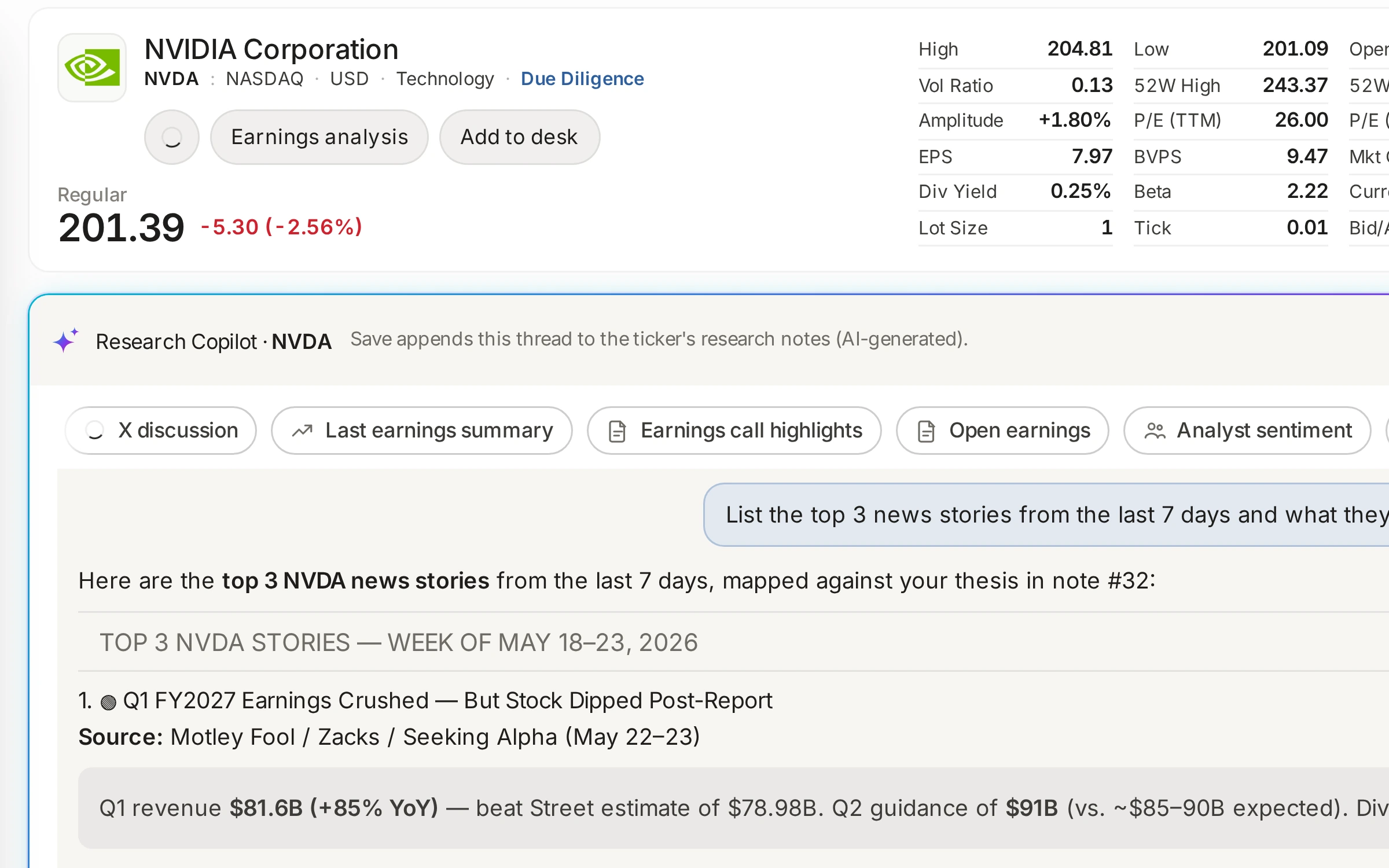
A real thread on NVDA, showing the prompt chips, the week's top stories and the quarter's revenue against the street.
- Research Copilot · NVDA, under the company header
- Prompt chips, then the thread
- Save appends the thread to the company's research note
Research Copilot, in numbers
- 1 threadOne per company, kept for you on its page.
- 8 promptsReady for the common questions, from earnings to risks.
- T2The research tier, with the full research toolkit.
- 24 stepsModel calls a single turn can make.