

Cairn Chat
The desk's assistant on every page, where you choose the tier and can watch each turn as it works. It keeps a long memory, and your conversations can be filed to your research notes.
One conversation, from question to research note
Every message you send is a turn. Cairn picks the tier, works through its tools step by step, answers, remembers the turn, and keeps the conversation so it can be filed with the rest of your research.
-
1
Ask
CairnOpens on every page of the desk, docked, floating or maximized, and takes the files you attach.
YouAsk in plain words or start with a command such as /research, /brief or /save.
-
2
Route
CairnOn Auto, a router picks the tier for each turn, and if a quick answer comes back thin, it is re-run once at T2 Research.
YouOr pin a tier yourself: T1 Chat, T2 Research, T3 Agent or TD Direct.
-
3
Work
CairnWorks through the turn in steps, up to 24 model calls, using the tier's tools: market data, research notes, the web and more.
YouWatch the step counter, allow or deny anything it would write, or stop the turn.
-
4
Answer
CairnStreams the answer as it is written, and on T2 and T3 it can include charts and financial tables.
YouIf you stop the turn, you keep everything already streamed.
-
5
Remember
CairnWrites the turn into your journal and carries your profile and recent weeks into the next conversation.
YouEdit your long-term memory in Settings at any time.
-
6
File
CairnKeeps every conversation, and if you delete one with real content, it is filed to Research Notes first.
YouUse /save to file the whole conversation to the company's note.
The next conversation starts with what the last one taught it.
Five tiers, one picker
Each tier sets the model, the tools and what the assistant is allowed to do. You can pick one for the whole conversation, or let Auto choose for each turn.
- AutoRouter
The router picks T1 or T2 for each turn, and a quick answer that comes back thin is re-run once at T2.
- T1 ChatSonnet 5.5
Sonnet with a curated set of web and live-data tools. It is fast, and it never writes anything.
- T2 ResearchMost researchSonnet 5.5
Sonnet with the full research toolkit and context: notes, pipelines, market data, AceCamp, charts and a Python sandbox. Anything it writes waits until you allow it.
- T3 AgentOpus 5.5
Opus with every tool, files and code included, for work that takes many steps. Anything it writes waits until you allow it.
- TD DirectOpus · GPT · Grok
Your message goes straight to Opus, GPT or Grok, with web and live data and no agent loop.
Each user has a budget. At 80% you get a warning, at 90% turns drop down a tier, and at 100% chat stops until the budget resets.
Inside a turn
A turn is one message plus everything Cairn does to answer it. You can follow each step as it happens, and nothing is written without your go-ahead.
Each turn can make up to 24 model calls, and the panel counts them as it goes ("Step 2 of 24"). If it reaches the limit, it stops and asks whether you want to continue.
The turn runs on the server, so it carries on if your browser disconnects, and a dropped stream is retried.
When you stop a turn, you keep everything already streamed, and any calls still pending are dropped.
Use /research, /brief, /compare, /analyze, /save and more, plus /r, /a and /q to switch tiers in the middle of a conversation.
A long memory
Cairn remembers in layers, from the conversation you are having back through the years, and each turn brings in up to 10 KB of whatever is relevant to it.
- This conversation
The conversation is kept in full until it passes 32,000 characters. Then it compacts itself into a summary, while the original messages stay on screen.
- Your profile
What Cairn should always know about you and your desk, which you can read and edit in Settings.
- The last 30 days
Every turn is written to your journal. The last 7 days come in whole, along with up to 8 relevant entries from the three weeks before that.
- Weeks, months and years
Older entries roll up into weekly, monthly and yearly digests, and the ones that match your question are brought back in.
Your research notes keep the record
Every conversation is kept and searchable. Use /save to file one into the notes you already work from, and one with real content is filed there before it is deleted.
- /save files the whole conversationThe conversation is filed word for word, with no model call, to the note you name, to the company's note when the conversation names one ticker, to the analyst's desk note, or to a journal note for the session.
- Nothing is deleted unfiledWhen you delete a conversation with real content, it is first filed to Research Notes as a chat archive, and if filing fails, the delete waits.
- Linked to the companyWhen an archive names a single ticker, it leaves a link on that company's note, right beside its research.
- Every session, searchableEvery session is kept. The panel lists the last seven days, and Chat Sessions lets you search all of them.
See it at work
An answer with its reasoning
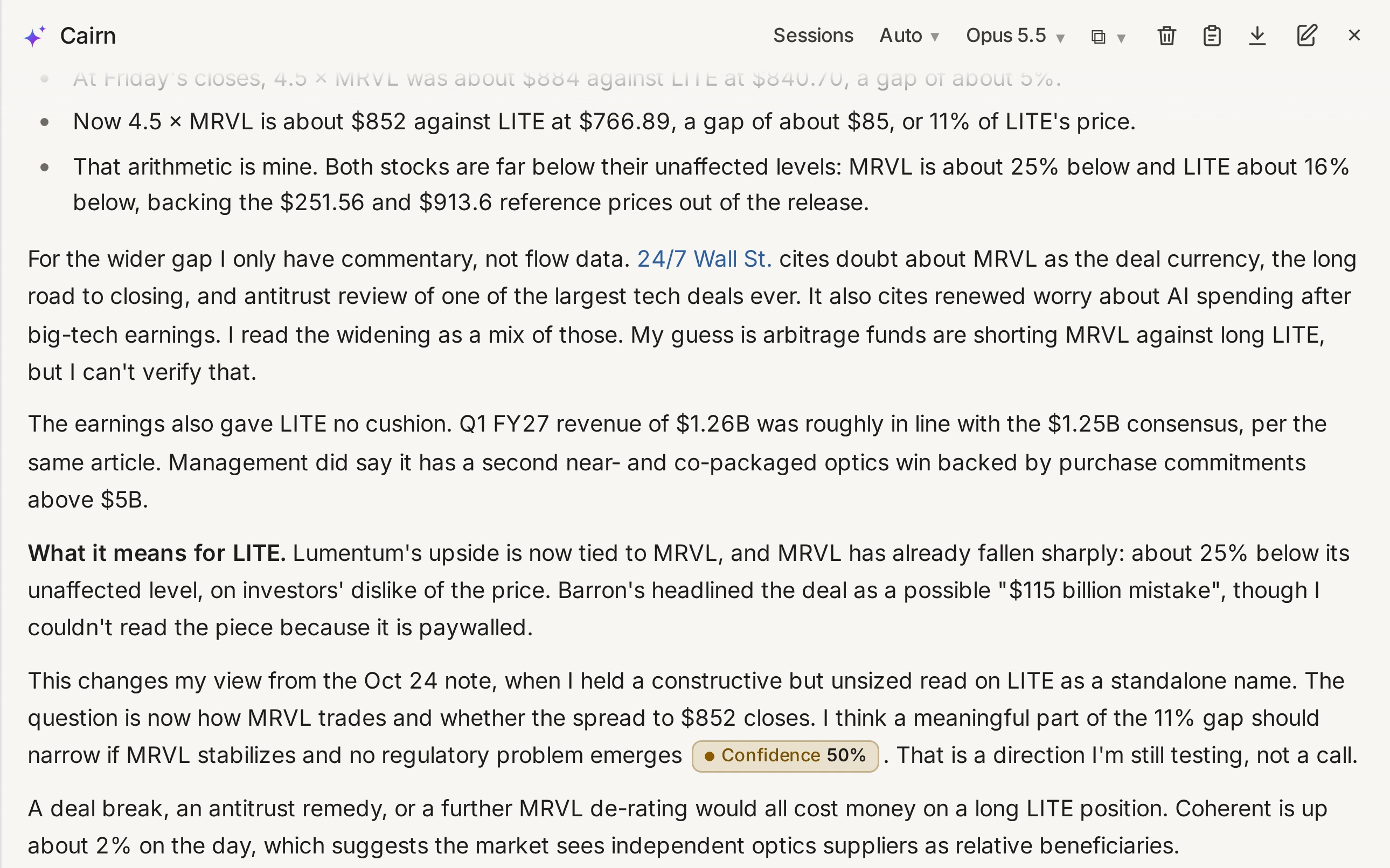
A real reply from the desk, showing the deal terms, the arithmetic it did itself, where it only has commentary to go on, and how confident it is.
- The header shows your sessions, the tier and the model
- Sources are linked in line, and the view carries a confidence mark
- Docked, floating or maximized, on every page
Cairn Chat, in numbers
- 5 tiersAuto, T1 Chat, T2 Research, T3 Agent and TD Direct.
- 24 stepsModel calls a single turn can make before it asks to continue.
- 10 KBThe most remembered context brought into any one turn.
- 15 MBPer document you attach, whether a PDF, an Office file or a spreadsheet; images can be up to 5 MB.